Made to be shared
People already screenshot fitness apps to post them. Today a screenshot of Fitnit is a grid of numbers with no name on it: it says nothing about where it came from and earns the person who posted it nothing. Three changes, each drawn against what exists now: a card designed to be the screenshot, a prompt at the exact moment someone takes one, and the milestones people already screen-record.
The Today card — a screenshot that is also an ad
One full-width card at the top of Home, composed from the widgets that already exist: the
calorie ring, the streak, steps, this week's weight change. It is laid out to be cropped and posted
as-is — wordmark and referral code in the corner, so every post attributes itself and pays the poster.
A share glyph on the card renders it in story and square formats through the
ShareCardModal that runs and walks already use.
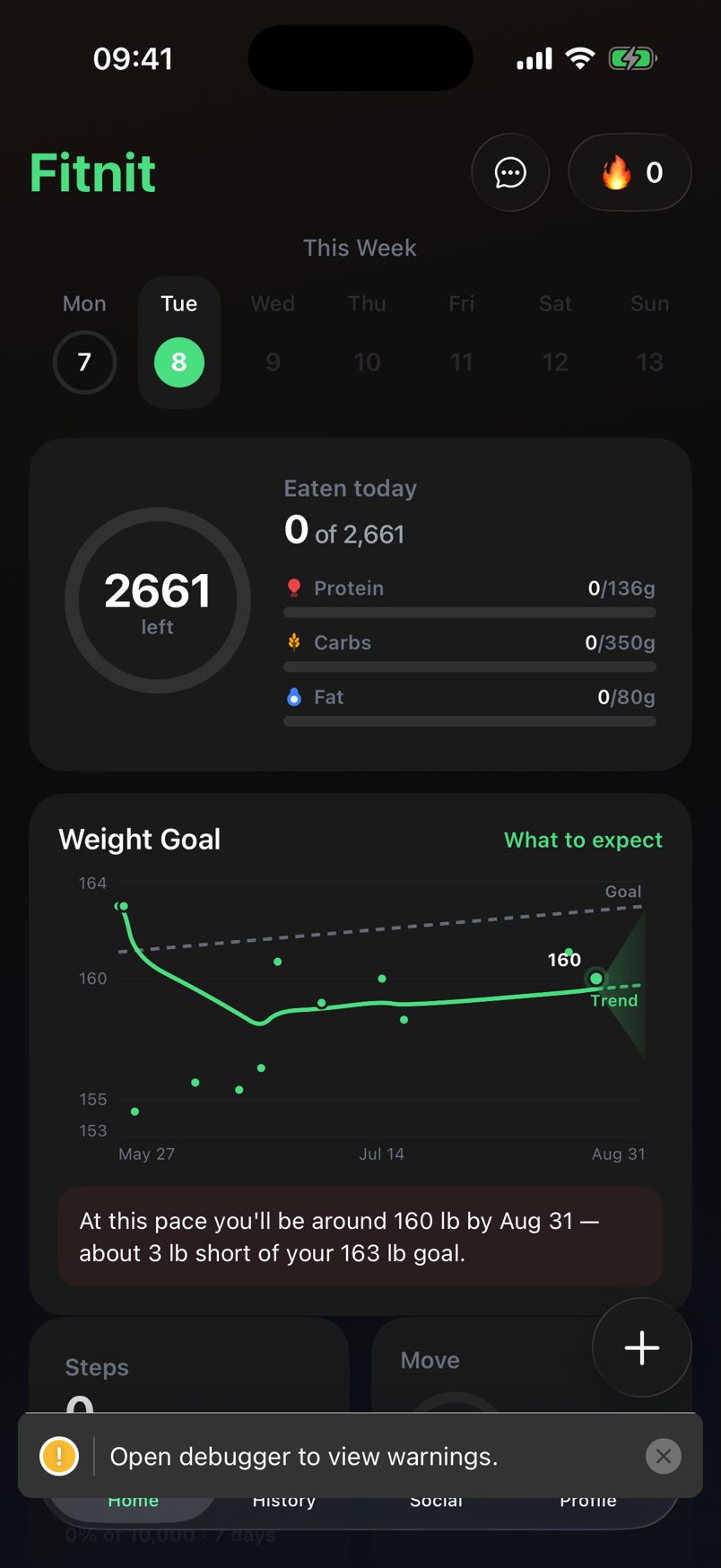
Good numbers, no name. Nobody seeing this reposted knows what app it is, and the person who posted it gets nothing for the referral it just made.
On Home it is the first card. The three stats are the ones a person would brag about; the ring is the one they would explain.
As it exports. 9:16 for a story or a TikTok slide, 1:1 for a feed. The code is the person's existing referral code; the link resolves through Affiliateo so the install is attributed and the commission is theirs.
The screenshot is the moment
iOS tells an app when the user takes a screenshot
(UIApplicationUserDidTakeScreenshot). That is the highest-intent second in the whole app:
the person has already decided to show someone. Offer the rendered card and their link right then.
One sheet, two buttons, never twice in a day.
The screenshot lands in Photos. If it gets posted, it gets posted without a name, a link, or a code — and the app never knew it happened.
Share your progress?
We made you a card — with your link on it.
Shown once a day at most. Off in Settings → Sharing.
Moments people already record
A streak milestone, a personal record, a goal reached. These are the frames people screen-record for a TikTok — the number counting up, the burst, the "did it" — and today Fitnit shows them as a toast. Make each one a full-screen moment with a single button, and the export is the same card as 01 with the milestone as its headline.
The PR card says counted on purpose. A camera-verified rep count is the one claim a fitness screenshot can make that a rival cannot, and it is the thing worth being asked about in the comments.
Viral moments — what to film
A picture gets a like; a clip gets a duet. The clips come from the parts of Fitnit that move, and most of them already exist — what they lack is a reason to be filmed and, in a few cases, an export. Each row is a moment, its three-second hook, what is on screen, and whether it can be filmed today.
| Moment | Three-second hook | On screen | Today |
|---|---|---|---|
| Camera-counted reps | "My phone counts my push-ups" | Live camera, pose skeleton, the number ticking, PR burst at the end | Filmable now. An in-app clip export with the overlay would turn it into a one-tap share. |
| Future You reveal | "This is me in a year" | Scan photo → generated photo, wiped by a slider | Exists as two images. Needs the slider. |
| Weight chart draw-in | "At this pace…" | Trend line draws to the projection cone, sentence types in | Static today. One animation on open. |
| Streak / PR moment | "Day 12" | Full-screen count-up, burst, one button (03) | Toast today. Needs 03. |
| Voice-logging a meal | "Two eggs and toast" → the ring moves | Mic, the transcript, calories counting up, macro bars sliding | Filmable now. |
| Month filling in | 30 days in 3 seconds | The heat-map painting day by day | Static today. A staggered fill on first open. |
| Run replay | The route draws itself | Map, the line racing the route, pace and splits overlaid | Replay exists on screen. Video export was explicitly not built — the one row that needs real work. |
| Water + / − | The satisfying tap | Bottle fills, haptic, 5/8 → 6/8 | Filmable now. A loop, not a story — B-roll. |
What makes it beautiful on a phone screen
Order of work
| Change | Already built | Real cost | Do it |
|---|---|---|---|
| 01 · Today card | Every number; ShareCardModal; referral code + link | One composite widget + two export layouts. Must read well at zero — a new user's first screenshot is all zeros. | First. Everything else exports this card. |
| 02 · Screenshot sheet | The card from 01 | One listener, one sheet, a once-a-day guard, a Settings toggle. | Second. Smallest change, highest-intent moment. |
| 04 · Viral moments | Rep counting, Future You, voice logging, the water tap | Three animations (chart draw-in, month fill, reveal slider) and one export (run replay video). | Film the three that exist this week; build the animations as they come up. |
| 03 · Moments | Achievement + PR events already fire | One full-screen route, a count-up, the burst. Same export as 01. | Third. The only one that makes a video, not a picture. |
src/public/lab/share.html